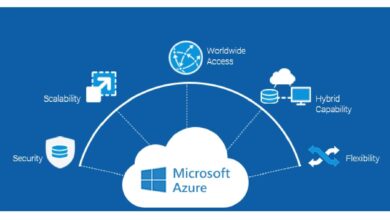
If you’re dealing with data in the cloud, Azure Data Factory isn’t just another tool—it’s your ultimate game-changer. This powerful ETL service simplifies data integration across hybrid and multi-cloud environments, making complex workflows feel effortless.


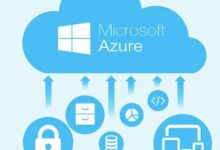

What Is Azure Data Factory and Why It Matters

Azure Data Factory (ADF) is Microsoft’s cloud-based data integration service that enables organizations to create, schedule, and manage data pipelines. These pipelines automate the movement and transformation of data from various sources to destinations, supporting both on-premises and cloud data stores.
Core Definition and Purpose
Azure Data Factory acts as a central hub for orchestrating data workflows. It allows users to build ETL (Extract, Transform, Load) or ELT (Extract, Load, Transform) processes without managing infrastructure. This serverless architecture means you pay only for what you use, making it cost-effective and scalable.
- Enables seamless integration between disparate data systems.
- Supports batch and real-time data processing.
- Integrates natively with other Azure services like Azure Synapse Analytics, Azure Blob Storage, and Azure SQL Database.
“Azure Data Factory is not just about moving data—it’s about orchestrating intelligence across your enterprise.” — Microsoft Azure Documentation
Evolution from SSIS to Cloud-Native Pipelines
Before ADF, many enterprises relied on SQL Server Integration Services (SSIS) for data integration. While SSIS was powerful, it was limited by its on-premises nature and required significant infrastructure management.
Azure Data Factory emerged as the natural evolution—offering cloud scalability, hybrid connectivity, and modern DevOps practices. With ADF, teams can now deploy pipelines globally, integrate with Git repositories, and automate CI/CD workflows.
- ADF supports SSIS package migration via Azure-SSIS Integration Runtime.
- Provides enhanced monitoring and logging through Azure Monitor and Log Analytics.
- Enables containerized execution of SSIS workloads in the cloud.
Key Components of Azure Data Factory
To fully leverage Azure Data Factory, it’s essential to understand its core building blocks. Each component plays a vital role in designing robust, maintainable data pipelines.
Data Pipelines, Activities, and Datasets
The foundation of any ADF solution lies in pipelines, activities, and datasets.
- Pipelines: Logical groupings of activities that perform a specific task (e.g., ingest sales data, transform customer records).
- Activities: Individual actions within a pipeline, such as copying data, executing a stored procedure, or running a Databricks notebook.
- Datasets: Pointers to the data you want to use within activities—they define the structure and location but don’t store the data itself.
For example, a pipeline might include a Copy Activity that moves data from an on-premises SQL Server (source dataset) to Azure Data Lake Storage (sink dataset).
Linked Services and Integration Runtimes
These components enable connectivity and execution across environments.
- Linked Services: Define connection details to external resources (e.g., connection strings, authentication methods). They are analogous to connection strings in traditional applications.
- Integration Runtimes (IR): The compute infrastructure that ADF uses to execute activities. There are three types:
- Azure IR: Runs in the cloud and handles data movement between cloud services.
- Self-Hosted IR: Installed on-premises to access local data sources securely.
- SSIS IR: Executes SSIS packages in the cloud, enabling hybrid migration scenarios.
Choosing the right IR is crucial for performance and security, especially when dealing with sensitive or firewalled data sources.
How Azure Data Factory Enables Hybrid Data Integration
One of ADF’s standout capabilities is its support for hybrid data scenarios—where data resides both on-premises and in the cloud. This flexibility makes it ideal for organizations undergoing digital transformation.
Connecting On-Premises Data Sources
Using the Self-Hosted Integration Runtime, ADF can securely connect to databases like Oracle, MySQL, or SQL Server running behind corporate firewalls.
- The IR acts as a bridge, initiating outbound connections to Azure (no inbound ports required).
- Supports Windows Authentication, certificate-based auth, and OAuth for secure access.
- Can be deployed across multiple nodes for high availability and load balancing.
This ensures compliance with enterprise security policies while enabling cloud-based orchestration.
Secure Data Transfer Across Environments
Security is paramount when moving data across networks. ADF employs several mechanisms to protect data in transit and at rest.
- Uses TLS 1.2+ for all data transfers.
- Supports private endpoints via Azure Private Link to keep traffic within the Microsoft backbone network.
- Integrates with Azure Key Vault for managing credentials and secrets.
By leveraging these features, organizations can meet strict regulatory requirements like GDPR, HIPAA, or SOC 2.
Powerful Data Transformation Capabilities in Azure Data Factory
While data movement is important, transformation is where real value is created. Azure Data Factory offers multiple ways to transform data, from simple mappings to complex code execution.
Mapping Data Flows: No-Code Transformation
Mapping Data Flows is ADF’s visual, code-free transformation engine built on Apache Spark. It allows users to design transformations using a drag-and-drop interface.
- Supports data cleansing, aggregation, joins, pivoting, and derived columns.
- Runs on auto-scaling Spark clusters managed by Azure.
- Generates optimized Spark code under the hood, ensuring efficient execution.
This feature is ideal for analysts and BI developers who want to build transformations without writing code.
Integration with Azure Databricks and HDInsight
For advanced analytics and machine learning workflows, ADF integrates seamlessly with big data platforms.
- Azure Databricks: Run Python, Scala, or SQL notebooks as part of a pipeline.
- Azure HDInsight: Execute Hive, Spark, or Hadoop jobs directly from ADF.
- Enables end-to-end ML pipelines: ingest data → train model → deploy predictions.
This integration empowers data engineers and scientists to build sophisticated data products within a unified orchestration layer.
Orchestration and Scheduling: Automating Workflows at Scale
Azure Data Factory excels at orchestrating complex workflows involving multiple systems, dependencies, and schedules.
Trigger Types: Schedule, Tumbling Window, and Event-Based
ADF supports various trigger types to initiate pipeline execution:
- Schedule Triggers: Run pipelines at fixed intervals (e.g., daily at 2 AM).
- Tumbling Window Triggers: Ideal for time-series data processing, where each window processes a fixed time chunk (e.g., hourly batches).
- Event-Based Triggers: Start pipelines when a file arrives in Blob Storage or an event is published to Event Grid.
These triggers ensure timely and responsive data processing aligned with business needs.
Dependency Chains and Pipeline Dependencies
Real-world data workflows often involve dependencies—Pipeline B should only run after Pipeline A completes successfully.
- ADF allows defining explicit dependencies between pipelines.
- Supports conditional execution using IF conditions, Switch activities, and Until loops.
- Enables error handling with Try-Catch patterns via Execute Pipeline and Fail activities.
This level of control makes ADF suitable for mission-critical data operations.
Monitoring, Management, and DevOps with Azure Data Factory
Building pipelines is one thing; managing them in production is another. ADF provides comprehensive tools for monitoring, versioning, and deployment.
Monitoring with Azure Monitor and ADF UX
The ADF portal includes a powerful monitoring interface showing pipeline runs, durations, and statuses.
- View real-time logs and error messages.
- Set up alerts using Azure Monitor when failures occur.
- Use Metrics Explorer to track data throughput and latency.
This visibility helps teams quickly identify and resolve issues before they impact downstream systems.
CI/CD Implementation Using Git and Azure DevOps
To support team collaboration and reliable deployments, ADF integrates with Git repositories and DevOps pipelines.
- Enable Git integration (Azure Repos or GitHub) for version control.
- Develop in a development factory, test in staging, and promote to production.
- Use ARM templates or DevOps release pipelines to automate deployment across environments.
This approach ensures consistency, traceability, and rollback capability—key pillars of modern data engineering.
Real-World Use Cases of Azure Data Factory
The true power of Azure Data Factory becomes evident when applied to real business challenges. Here are some common scenarios where ADF delivers significant value.
Cloud Data Warehouse Loading (e.g., Azure Synapse)
Organizations often need to load data into a cloud data warehouse for reporting and analytics.
- ADF extracts data from ERP, CRM, and operational databases.
- Transforms and cleanses data using Mapping Data Flows or external compute.
- Loads results into Azure Synapse Analytics or Snowflake via optimized connectors.
This enables near-real-time dashboards and historical analysis with high performance.
Big Data Ingestion and Lakehouse Architecture
With the rise of data lakes, ADF plays a central role in building lakehouse architectures.
- Ingests structured, semi-structured, and unstructured data (JSON, CSV, Parquet) into Azure Data Lake Storage.
- Applies schema enforcement and metadata tagging using Azure Purview integration.
- Orchestrates processing by Databricks or Synapse for analytics and AI.
This creates a scalable, governed data foundation for advanced analytics.
Migration from On-Premises ETL to Cloud
Many companies are retiring legacy ETL tools like Informatica or SSIS in favor of cloud-native solutions.
- ADF allows incremental migration of SSIS packages using the SSIS IR.
- Rebuilds complex workflows using native ADF activities and data flows.
- Reduces TCO by eliminating hardware and licensing costs.
This transition improves agility, scalability, and resilience of data operations.
Best Practices for Optimizing Azure Data Factory Performance
To get the most out of Azure Data Factory, following proven best practices is essential.
Optimizing Copy Activity Performance
The Copy Activity is the most commonly used component in ADF. Optimizing it can drastically reduce execution time.
- Use polybase or copy via staging when loading large volumes into Azure SQL Data Warehouse.
- Enable parallel copies and adjust degree of copy parallelism based on source/destination throughput.
- Leverage compression (e.g., GZip) during transfer to reduce bandwidth usage.
Microsoft provides a performance tuning guide with detailed benchmarks and recommendations.
Designing Reusable and Modular Pipelines
As data factories grow, maintainability becomes critical.
- Create parameterized pipelines to reuse logic across different data sources.
- Use variables and expressions (e.g., @pipeline().RunId) for dynamic behavior.
- Break complex workflows into smaller, testable components.
This modular approach enhances readability, reduces duplication, and simplifies debugging.
Security, Compliance, and Governance in Azure Data Factory
In enterprise environments, security cannot be an afterthought. ADF provides robust mechanisms to ensure data integrity and regulatory compliance.
Role-Based Access Control (RBAC) and Data Protection
ADF integrates with Azure Active Directory (AAD) for identity management.
- Assign roles like Data Factory Contributor, Reader, or custom roles using Azure RBAC.
- Apply Azure Policy to enforce tagging, encryption, or resource placement rules.
- Enable data encryption at rest using Microsoft-managed or customer-managed keys (CMK).
These controls help prevent unauthorized access and ensure audit readiness.
Audit Logging and Compliance Reporting
For compliance, organizations need detailed logs of who did what and when.
- Enable diagnostic settings to stream logs to Log Analytics, Event Hubs, or Storage.
- Track user actions, pipeline executions, and authentication events.
- Generate reports for SOX, HIPAA, or ISO 27001 audits using Azure Sentinel or Power BI.
This transparency builds trust and supports governance initiatives.
What is Azure Data Factory used for?
Azure Data Factory is used to build data integration and ETL/ELT pipelines in the cloud. It enables organizations to automate the movement and transformation of data from various sources—on-premises, cloud, or hybrid—into data warehouses, data lakes, or analytics platforms for reporting and machine learning.
How does Azure Data Factory differ from SSIS?
While both are ETL tools, Azure Data Factory is cloud-native, serverless, and designed for scalability and hybrid integration. SSIS is on-premises, requires infrastructure management, and has limited cloud orchestration capabilities. ADF also supports modern DevOps practices, Git integration, and advanced monitoring.
Can Azure Data Factory transform data?
Yes, Azure Data Factory can transform data using Mapping Data Flows (a no-code Spark-based engine), or by integrating with transformation services like Azure Databricks, HDInsight, Azure Functions, or SQL Server stored procedures.
Is Azure Data Factory expensive?
Azure Data Factory uses a pay-per-use pricing model. While costs can add up with high-volume data processing, it’s generally cost-effective due to its serverless nature. You only pay for pipeline runs, data integration units (DIUs), and optional SSIS runtime usage. Proper optimization can significantly reduce expenses.
How do I monitor pipelines in Azure Data Factory?
You can monitor pipelines using the ADF portal’s Monitoring tab, which shows run history, durations, and errors. For advanced monitoring, integrate with Azure Monitor, Log Analytics, and Application Insights to set up alerts, dashboards, and automated responses to failures.
In summary, Azure Data Factory is a transformative tool for modern data integration. Its ability to orchestrate hybrid workflows, support powerful transformations, and integrate with the broader Azure ecosystem makes it indispensable for data-driven organizations. Whether you’re migrating from legacy ETL, building a data lakehouse, or automating analytics pipelines, ADF provides the scalability, security, and flexibility needed to succeed in today’s data landscape. By following best practices in design, performance, and governance, teams can unlock the full potential of their data assets efficiently and reliably.
Recommended for you 👇
Further Reading: